Turn Microsoft Teams Into Your Business Phone System
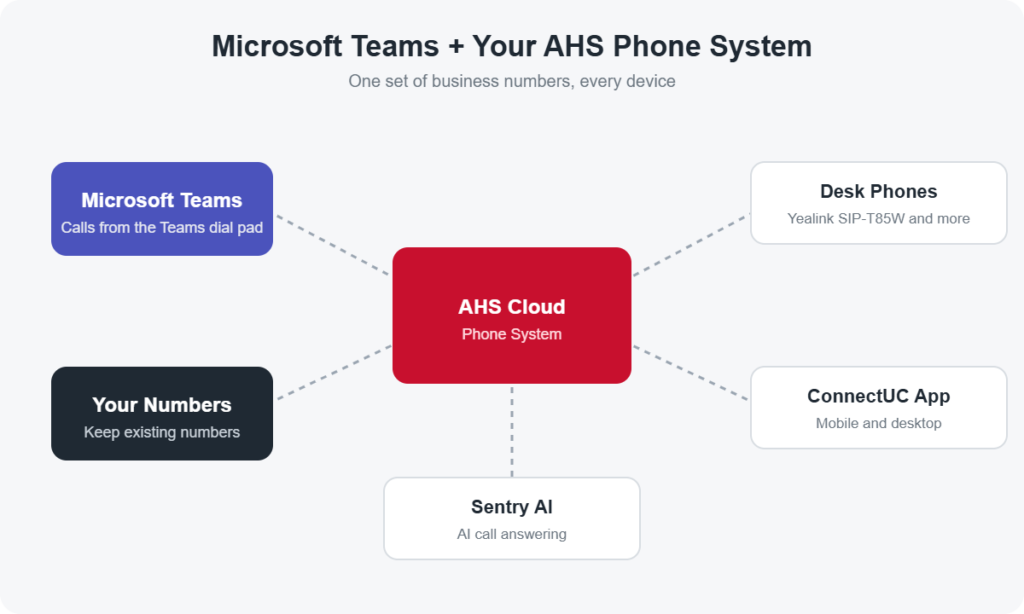
Make and receive regular phone calls right inside Microsoft Teams, using your own business numbers. Advanced Hosted Services connects Teams to our cloud phone system, so your team can call from Teams, a Yealink desk phone or the ConnectUC mobile app, all on one system, with live support 24×7.
- Call from the Teams dial pad on desktop, web and mobile
- Keep your existing phone numbers
- Mix Teams users, desk phones and mobile users freely
- No equipment to install and no session border controller to manage
- Set up and supported by a real person, 24×7
What You Get
Native Teams Calling
Place and answer calls from the Teams dial pad, transfer calls and see calling in the same app your team already uses for chat and meetings.
Keep Your Numbers and Carrier
Bring your existing business numbers. We connect them to Teams without forcing you to change carriers or rebuild your phone setup.
Flexible Connection Options
We connect through Operator Connect, Direct Routing or our PBX connector, and can run them side by side for different users or locations.
Full Phone System Features
Ring groups, time frames, auto attendants, voicemail to email and user administration from the AHS phone system, now available to Teams users.
AI and Call Recording
Add Sentry AI to answer and route calls, and record calls with compliance tools, such as pausing recording while a caller shares payment details.
Secure and Reliable
Built on a SOC 2 Type 2–certified platform running on Microsoft Azure, with an admin portal for managing users and numbers.
Why Choose AHS for Teams Calling
- Real support, 24×7. Call, email or open a ticket any time and reach a real person. Changes happen quickly, without waiting on Microsoft support.
- One provider for every device. Teams, Yealink desk phones and the ConnectUC app work together in a single package.
- Easy migration. We plan the move, port your numbers and configure Teams, so you are not spending months on setup.
- Veteran-owned and local. A New York State–certified Service-Disabled Veteran-Owned Business in Farmingdale, NY, serving customers nationwide.
What You Need to Get Started
- A Microsoft 365 or Office 365 license that includes Teams for each calling user
- Microsoft Teams Phone for each calling user
- Access to your Microsoft 365 global administrator during setup
Not sure which licenses you have? We’ll review them with you and recommend the most cost-effective setup.
Pricing
Teams calling is available as a Teams-only seat or as an add-on for users already on the AHS phone system. Contact us for pricing at 1-833-467-8331 or request a quote.
Frequently Asked Questions
How much does Microsoft Teams calling cost?
Teams calling is available as a Teams-only seat or as an add-on for existing AHS phone users. Pricing depends on your number of users and setup, so contact us for pricing and we’ll send a custom quote, usually within one business day.
Can I make regular phone calls from Microsoft Teams?
Yes. Advanced Hosted Services connects your business phone numbers to Microsoft Teams, so your team can make and receive calls from the Teams dial pad on desktop, web and mobile.
Can I keep my existing phone numbers?
Yes. You keep your existing business numbers, and we manage the transfer so callers reach you in Teams without any change on their end.
Do I still need desk phones?
No, but you can keep them. Teams users, Yealink desk phones and the ConnectUC mobile and desktop app all work together on the same AHS phone system, so each person can use what fits how they work.
What Microsoft licenses do I need?
Each calling user needs a Microsoft 365 or Office 365 license that includes Teams, plus Microsoft Teams Phone. We confirm the right licenses for your plan during setup and need access to a Microsoft 365 global administrator to complete the connection.
Do I need special equipment or a session border controller?
No. We connect Teams through Operator Connect, Direct Routing or our PBX connector, whichever fits your setup best, and we manage the connection for you.
Can Sentry AI answer calls in Teams?
Yes. Sentry AI, our AI virtual agent, can answer, route and schedule calls, then transfer callers to the right person in Teams.
Ready to Call From Teams?
Tell us how many Teams users you have and we’ll design the right setup, usually within one business day. Prefer to talk? Call 1-833-467-8331, any time.